
Overview
Scientific and engineering data management
sigclear-soig provides the dataset model, libsoig APIs and Programs for creating, inspecting and reorganizing scientific data within Workflow Automation.
.sg is the conventional extension for a binary SOIG dataset. Renaming a CSV or other file does not convert it. Inspect it with sgattribute and sgdump, rather than opening its binary contents in a text editor or printing them with cat.
Dataset structure
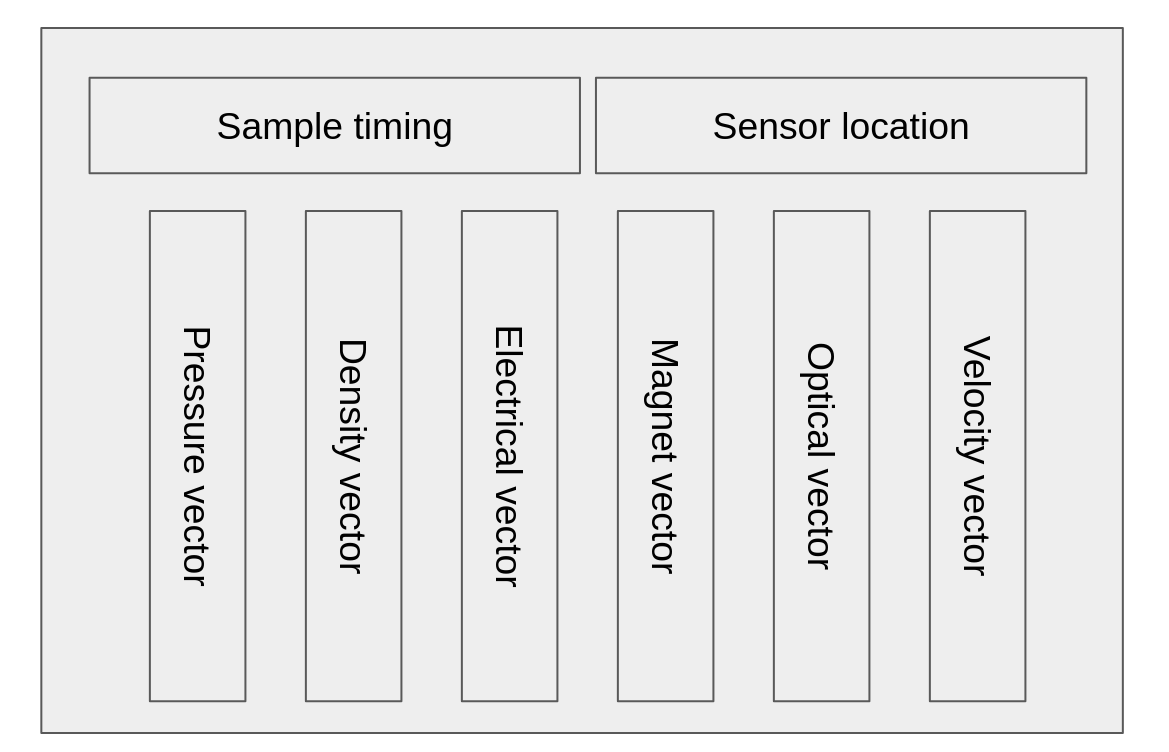
One schema, many measurement records
The header stores processing history, dataset-level attributes and a field schema. Every column contains values described by that same schema. Groups are consecutive runs of columns, rather than separate field definitions for each group.
| Component | Meaning for experiment design |
|---|---|
| History | Recorded processing commands. Retain raw inputs and the experiment definition as well. |
| Attributes | Common metadata, such as sampling coordinates and references to grouping or indexing fields. |
| Field schema | Each field's name, type and element count, shared by all columns. |
| Group | A consecutive run of columns sharing a group-key value. |
| Column | One record or measurement, which may contain an entire sampled trace. |
| Field values | Numeric scalars, fixed-width text or numeric vectors within a column. |
A column is not necessarily one numerical sample or one CSV row. A scalar-only dataset may represent one observation per column; a trace dataset can contain hundreds of samples within each column. Different vector fields may have different lengths, but each field's declared length applies to every column. Text fields have a fixed byte width.
seed.sg
├── Header
│   ├── Attributes: data.ns=100, data.s0=0, data.ds=0.001
│   │               group key → group field; index key → index field
│   └── Field schema: group (integer scalar), index (integer scalar),
│                    data (100 floating-point samples)
└── Columns: one group with group-key value 0
    ├── Column 0: group=0, index=0, data=[0, ..., 0]
└── Column 1: group=0, index=1, data=[0, ..., 0]Grouping rules
Choose the processing boundary explicitly
The group attribute identifies the scalar field used as the group key. Values in that field determine membership; the field need not itself be named group. The subgroup and index attributes likewise identify fields used by Programs that need subdivisions or indexing.
Group reads follow adjacent columns, not a global SQL-style group-by:
Column key values:  1, 1, 2, 1
Consecutive groups: [1, 1] [2] [1]  → three groups, not two
Decide which measurements belong together, arrange their order, and inspect the key before group-wise processing such as sgstack. Sorting or concatenating can change group boundaries.
SOIG does not automatically cluster measurements or guarantee statistical independence between groups. Experimental units, repeated measurements and statistical assumptions remain part of the experiment design.
Sampling and units
Keep coordinates consistent with the vector
For a regularly sampled vector named data, these header attributes describe its sampling:
| Attribute | Meaning | Value |
|---|---|---|
data.ns | Number of samples; must agree with the field schema. | 100 |
data.s0 | Coordinate of the first sample. | 0 |
data.ds | Interval between successive samples. | 0.001 |
The coordinate at zero-based sample index i is data.s0 + i * data.ds, for i=0,...,data.ns-1. The example spans 0 through 0.099, not 0.100. If the coordinate is time in seconds, the interval is 1 ms.
Use the vector's own name for other sampling attributes, such as pressure.ns, pressure.s0 and pressure.ds. These are common metadata, not extra samples or per-column measurements.
Record physical units, field meanings and missing-value conventions explicitly. Field names do not establish units, and a zero-filled vector is not automatically missing data. Check required types, lengths and spacing in each Program's manual; recheck sampling metadata after windowing, resampling or concatenation.
Quick example
Create two columns containing sampled vectors
sgcreate nx=2 data.ns=100 data.s0=0 data.ds=0.001 </dev/null >seed.sg
sgattribute <seed.sg
sgdump fields=group,index ncol=2 <seed.sg
sgdump ncol=1 <seed.sg
With the current implementation, the creation command produces two columns in one group, each with a zero-filled, 100-sample data vector. Explicit </dev/null selects new-dataset creation rather than transformation of an input dataset.
sgattribute shows history, attributes and field definitions. The first sgdump prints the scalar keys; the second prints vector values from one column. Its itime column is a zero-based sample index, not a physical time coordinate.
Run in a scratch directory with the required packages and valid entitlements. The expected structure is checked against the source, not a claim of execution with every released version. These synthetic zero values are not experimental observations.
Inspect and exchange
Validate the schema before processing
- Use
sgattributeto check field names, types, element counts, byte offsets and grouping/sampling attributes. - Use
sgdumpto inspect representative values and key sequences. Its diagnostic text is not a replacement binary dataset or a general-purpose interchange export. - Keep binary outputs redirected to a file or another Program; do not display them directly in the terminal.
- Retain raw inputs, converter parameters, physical units and acceptance checks in the experiment definition.
SOIG uses a native binary representation. Do not assume byte-order or architecture/ABI independence when moving files between systems. For external tools, select the appropriate I/O conversion Program and verify the resulting types, shapes and coordinates on a small sample.
Use sgloadcsv/sgoutcsv for supported table layouts, sgloadmat/sgoutmat for MATLAB exchange, and sgloadbin for explicitly described fixed-size binary records. Choose conversion parameters from the matching manual; conversion does not establish units or correct grouping automatically.
Processing considerations
Structure supports processing; the Program defines behavior
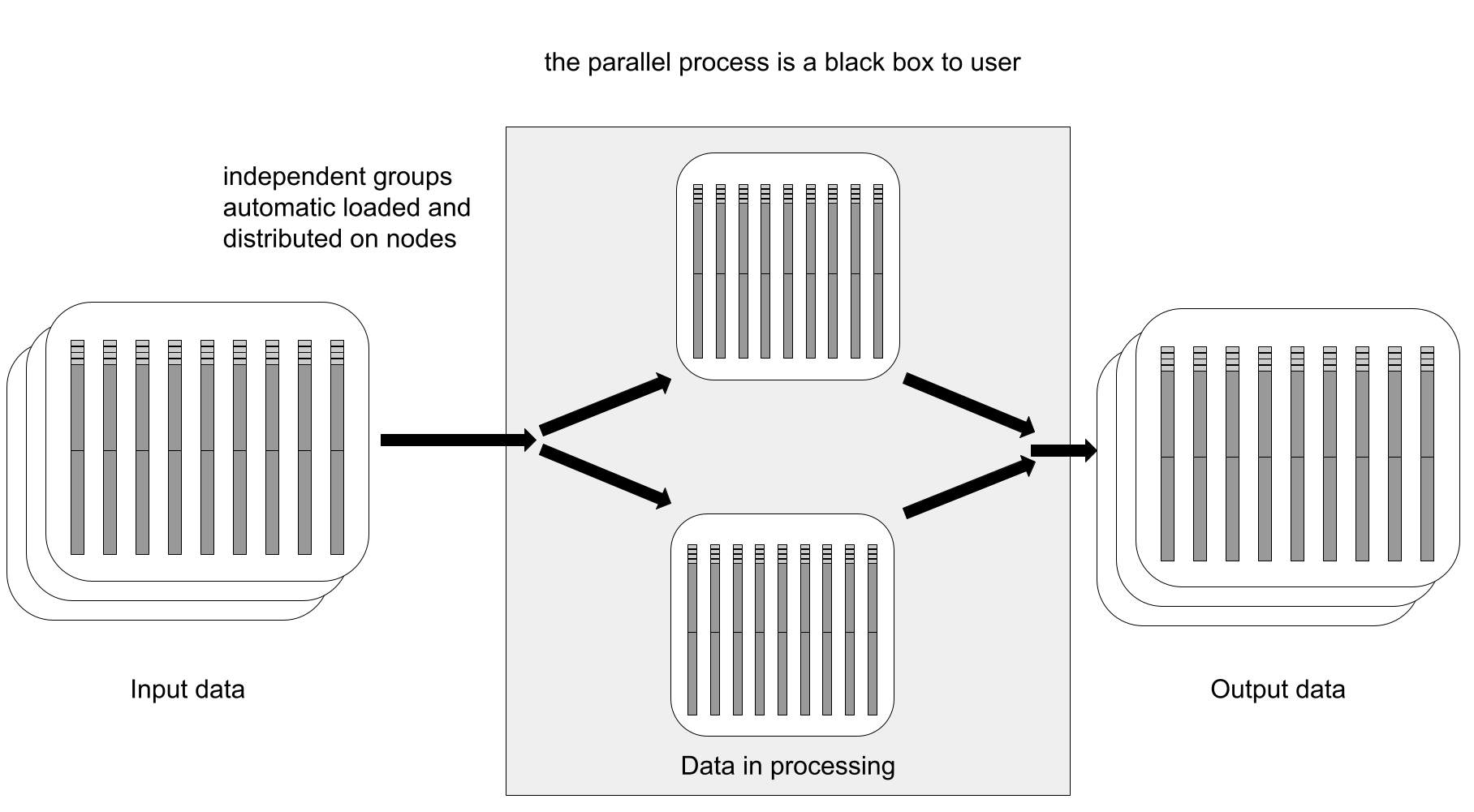
Programs using group reads work on consecutive groups. Memory needs depend on the group size, buffering and algorithm; not every Program reads one group at a time.
Parallel work depends on the Program and workflow implementation. Grouping alone does not enable automatic distributed execution; thread settings affect Programs that implement parallel work.
Use grouping and field structure to design QC Figures. Plot layout and regeneration are controlled by the plotting Program and Experiment definitions.
Custom Programs use a consistent interface across different scientific fields and measurement types.
Programs
Choose a Program
| Program | Purpose and design distinction |
|---|---|
sgcreate | Create or reshape datasets from field and sampling definitions; define units and grouping separately. |
sgattribute | Inspect or edit attributes. Plain invocation prints metadata; edit operations write a dataset. |
sgdump | Display scalar fields or vector values as diagnostic text, not a binary dataset. |
sgwindow | Select groups, columns, fields or samples; check retained sampling coordinates. |
sgsubvol | Partition coordinate ranges into subvolumes; review overlap and grouping. |
sgtruncate | Split vectors into segments or merge segments back; preserve segment metadata. |
sgsort | Sort columns using numerical keys; not categorical group-by aggregation. |
sgstack | Combine columns using existing groups; maximum mode selects magnitude, not the largest signed value. |
sgpad | Pad samples or duplicate boundary columns/groups; padding does not create new observations. |
sgcat | Merge datasets; group, subgroup and vector modes have different layout/sampling effects. |
sgfieldin | Import fields from an auxiliary dataset using matching conditions and declared mappings. |
sgfieldout | Collect scalar fields into vectors, producing one column per input group; not an external-format exporter. |
sgfieldtext | Supported text-to-identifier operations; not general text processing. Consult the manual for input-width requirements. |
Open the installed reference with man PROGRAM, for example man sgcreate, or choose a version and Program from the menu when published. Choose the version matching the installed package; a manual alone does not establish released availability.
Libraries and APIs
Access datasets with libsoig
The Package installs libsoig and its public soig.h interface. Custom Programs use the API to read and write groups, columns, fields, attributes and processing history consistently.
Scope
Numerical research data, not business records
SOIG is designed for numerical arrays and measurements produced by sensors, simulations and scientific algorithms. A relational database remains more suitable for customers, orders and other transactional records.